Turn-Based Tactical Combat in D&D 5e
Mystria can run turn-based combat right on the board: initiative is rolled, everyone moves within their speed, and attacks and common spells are resolved automatically from the character sheets. The GM stays in control of everything and can correct any result in one click. This guide covers combat in D&D 5e, the most complete system; the other systems are covered at the end.
Before combat: the map and the monsters
Combat takes place on the displayed map. For distances to be measured, the map needs a grid (one square = 1.5 m, or 5 feet) or, failing that, its real width. Without either, combat won't start and asks you for the map's size.
For enemies, open the Tokens panel, 📖 Bestiary tab (D&D 5e tables only). It contains the 317 creatures from the SRD 5.1. Search for "goblin" or "dragon", filter by challenge rating (CR) or by type, expand a creature to read its full stat block, then click Place ×1, ×3 or ×5. Tokens are numbered automatically: Goblin 1, Goblin 2…
A token placed by hand, without a sheet, can fight too: you'll give it HP, an AC, an attack bonus and damage when you start the combat.
1. Starting combat
The GM clicks Combat in the top bar (or presses C). The "Prepare combat" window opens:
- Participants: every character and every token on the map, each with a checkbox and a side (Ally, Enemy or Neutral, in one click). By default, PCs are allies and everything else is an enemy.
- Initiative: it's already rolled (1d20 + the initiative or Dexterity modifier). You can correct a score, reroll one die with 🎲, or reroll everything with Roll initiative.
- Combat music: pick a track from the session; it starts with the combat.
Click Start combat. The whole table sees "Combat begins", then the turn order.
2. Turn order
At the top of the screen, the turn tracker shows the combatants in order, with the active one at the front and a marker for the start of the next round. Clicking a portrait centers the view on its token. The Log, at the bottom left, narrates every action, with roll details on hover.
The player ends their turn with End turn; the GM can also move things along with Next turn (or go back with ◀). Combat ends when the GM clicks Finish or End combat: it doesn't stop on its own when the last enemy falls.
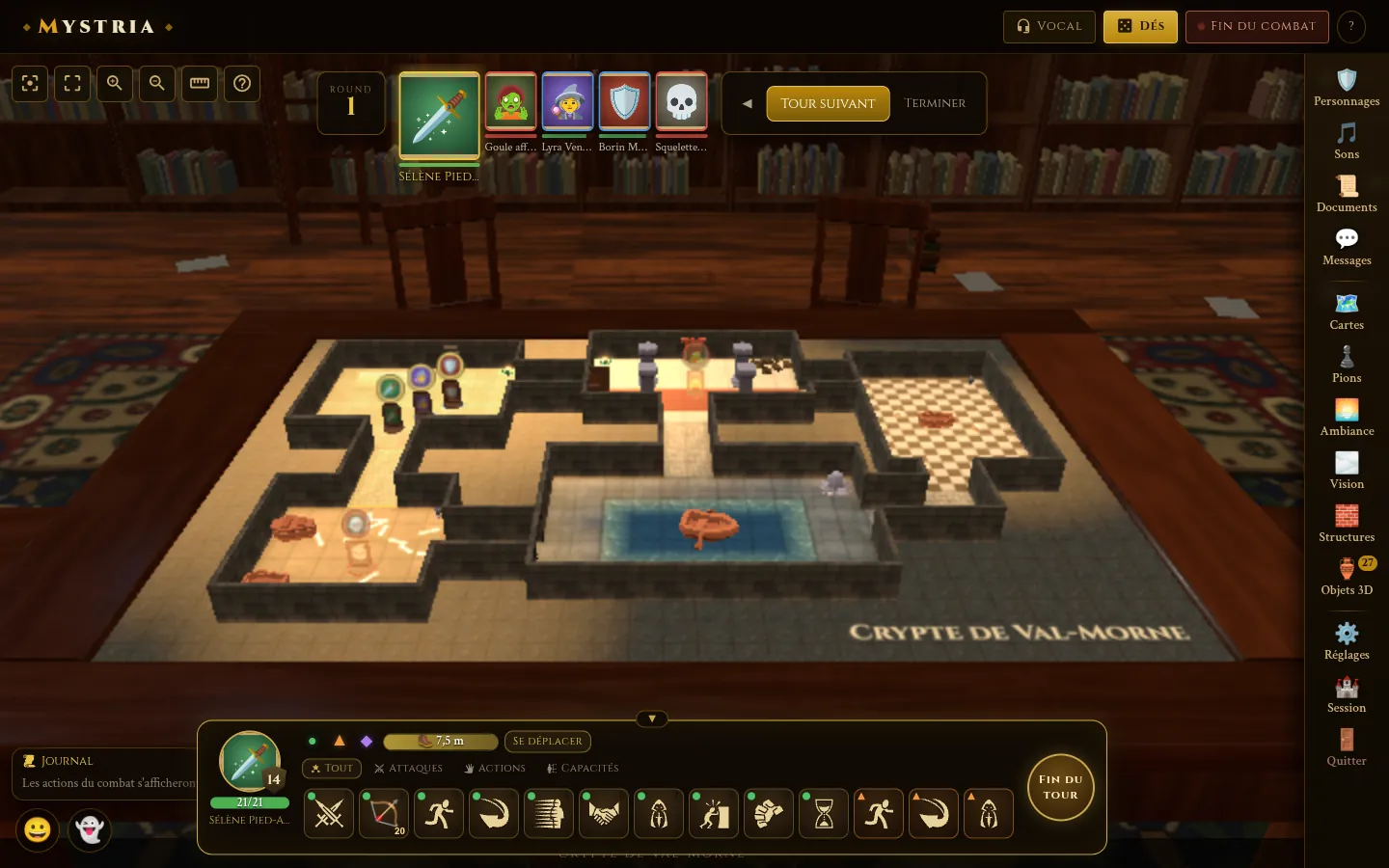
3. Your turn
The action bar at the bottom of the screen sums up your turn: your AC and HP, pips for your action (●), bonus action (▲) and reaction (◆), and how much movement you have left.
Moving
Drag your token, or click Move (M key) and then a square in the highlighted area. A bubble shows the length of the path and what you'll have left. The path goes around walls; a closed door blocks the way, and you can't pass through a square occupied by a standing creature, even an ally. You can split your movement around your actions.
Taking actions
The icons in the bar are your options, which you can filter (Attacks, Spells, Actions, Features) and reach with keys 1 to 9. You'll find:
- your attacks, taken from the weapons equipped on your sheet;
- your spells, with the spell slot level to choose;
- common actions: Dash, Disengage, Dodge, Help, Hide, Shove, Grapple, Stand Up…
- class features: Second Wind, Rage, Cunning Action, Divine Smite, Bardic Inspiration, Martial Arts, Wild Shape, and many more. Sneak Attack and Extra Attack apply on their own.
- items from your pack: potions, thrown weapons, scrolls.
Hover over a target to see your chance to hit and the reasons for any advantage or disadvantage (hidden target, prone, behind cover…). Escape cancels, Enter confirms the targets.
Attacks
The attack roll is compared to the target's AC, damage is applied directly, and the numbers appear on the board. A critical hit doubles the damage dice. Resistances, immunities and vulnerabilities are taken into account, as are temporary HP. Ammunition is tracked; at the end of combat, half of the arrows fired return to your pack.
Spells
Around a hundred SRD spells are automated: spell attacks, saving throws against your DC (with half damage on a success when the spell says so), healing, buffs and debuffs. For an area spell, you place or aim the sphere, cone, line or cube on the board. Concentration checks happen automatically when you're hit. A spell that isn't automated is announced to the table, the slot is spent, and the GM rules on its effect.
Opportunity attacks
If a creature leaves your reach, an ⚡ Opportunity attack window offers to use your reaction with one of your weapons, or to let it pass. The GM answers for monsters. Disengaging avoids the attack.
4. Dropping to 0 HP
A PC at 0 HP falls and has only one option on their turn: the Death saving throw (10 or higher: success; 1: two failures; 20: they get back up with 1 HP). Three successes stabilize them, three failures kill them. A healing spell, Spare the Dying or a healer's kit can save them. Enemy monsters, on the other hand, die as soon as they hit 0 HP.
5. The GM's role during combat
- Monsters: on their turn, the GM's action bar shows the active combatant. The attacks from their stat block are automated, one per action. Spells, breath weapons, legendary actions and Multiattack are played by hand, reading the stat block.
- Corrections: right-clicking a portrait in the turn tracker opens the combatant's menu. There you can remove or restore HP (−10 to +10), change their side, manage their concentration, apply or remove conditions (Blinded, Charmed, Frightened, Poisoned, Prone, Restrained, Stunned…) and remove ongoing effects.
- The table's rules, under Settings › Combat, apply even mid-combat:
- Movement enforced (speed and walls respected) or free;
- Enemy HP hidden or visible: when hidden, players only see a status (unharmed, wounded, bloodied…);
- Diagonals at 1.5 m (5 feet) each (the core rule), 1.5 m then 3 m (5 then 10 feet), or real distance.
What's still up to you
Combat automates a lot, but not everything. Good to know before your first session:
- you can't add a combatant mid-fight: end the combat and start it again;
- there's no difficult terrain;
- an opportunity attack doesn't interrupt movement;
- end-of-turn saving throws against conditions imposed by a spell must be rolled by hand (except for Slow and Power Word Stun): the GM removes the effect in one click;
- the Ready action is ruled on by the GM.
What about other systems?
Turn-based combat works on every table. In Pathfinder 2e, you get three actions per turn, with the multiple attack penalty. In generic, you have the action, bonus action, reaction and attacks against AC. For Donjons & Chatons, Powered by the Apocalypse and Yellow, combat handles turns, movement and targets, and each action opens the system's dice roller: the GM applies the result.
No character yet? Start by creating a D&D 5e character.